




Diagnostic procedure for DYNAMAX start-stop car batteries encoding
The aim of this procedure is to correctly assign the new battery to the vehicle’s control unit (BMS – Battery Management System).
The control unit monitors:
- state of charge (SOC)
- battery capacity
- number of charging cycles
- temperature and voltage.
After replacing the battery, these values must be “reset”, otherwise the car:
- will charge the battery poorly
- Start-Stop may not work properly
- in some cases it will write an error “Battery Regulation” or “Energy Management Active”.
Encoding the new battery will ensure that the vehicle’s electronics correctly manage the charging, recuperation and start-stop functions, thereby extending the battery’s lifespan and preventing incorrect charging.
DIAGNOSTIC TOOLS OVERVIEW
| Brand | DIAGNOSTIC TOOL |
| VW / Audi / Škoda / Seat | BOSCH KTS 560/590 , Hella Gutmann Mega Macs series and other |
| BMW / Mini | |
| Ford | |
| Mercedes | |
| PSA (Peugeot/Citroën/Opel) | |
| Hyundai / Kia | |
| Renault/Dacia | |
| others… |
- Preparation
Before the actual encoding, the following needs to be done:
- Check the correct battery type according to OEM specifications (EFB, AGM, capacity, polarity, size). Never replace an AGM battery with an EFB type – the system may overload it (replace AGM only with AGM type. However, you can replace EFB with AGM type)
- Check the terminals, connection, cleanliness and battery voltage (must have at least 12.4 V)
- Connect a stabilized power supply (so-called support voltage) to the vehicle – ideally 13.0–13.5 V, so that there is no voltage drop during the writing.
- Connecting diagnostic tool VARIANT A
A diagnostic device that allows battery registration has to be used (e.g. Bosch KTS 560/590 , Hella Gutmann etc.). The tester is connected via the vehicle’s OBD-II port.
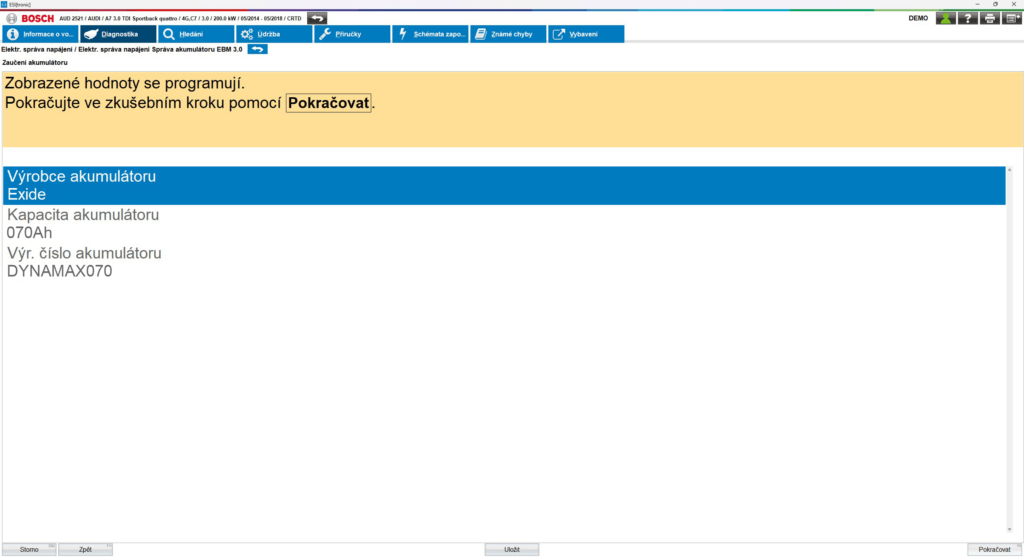
A specific example of a diagnostic procedure for encoding a 70Ah battery using BOSCH KTS560, Variant A on an AUDI A7 2014-2018
- Diagnostics => Service tasks => Electrical Power Management/Battery Replacement => Battery encoding (variant A)
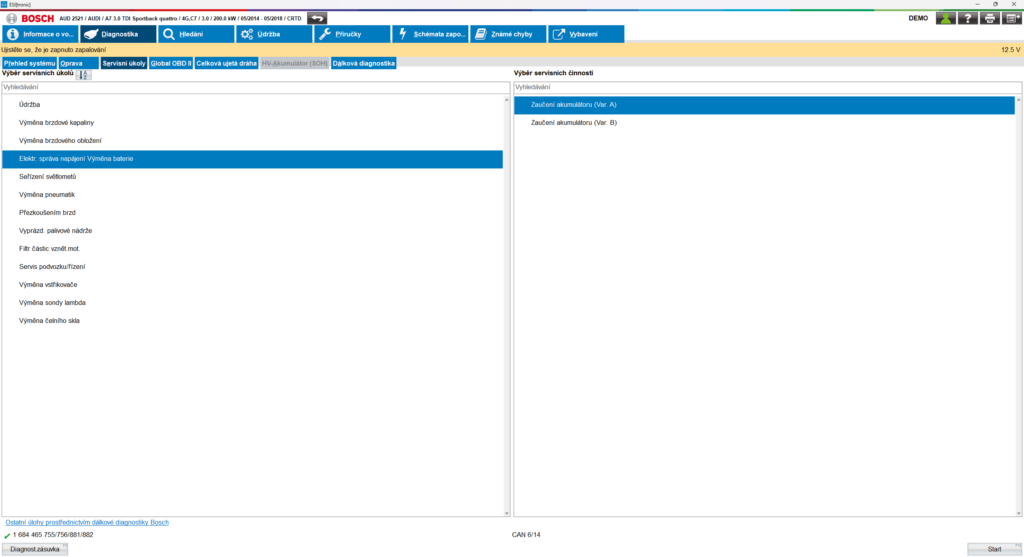
- Then, under the battery manufacturer, select one (any) of the available battery manufacturer options.
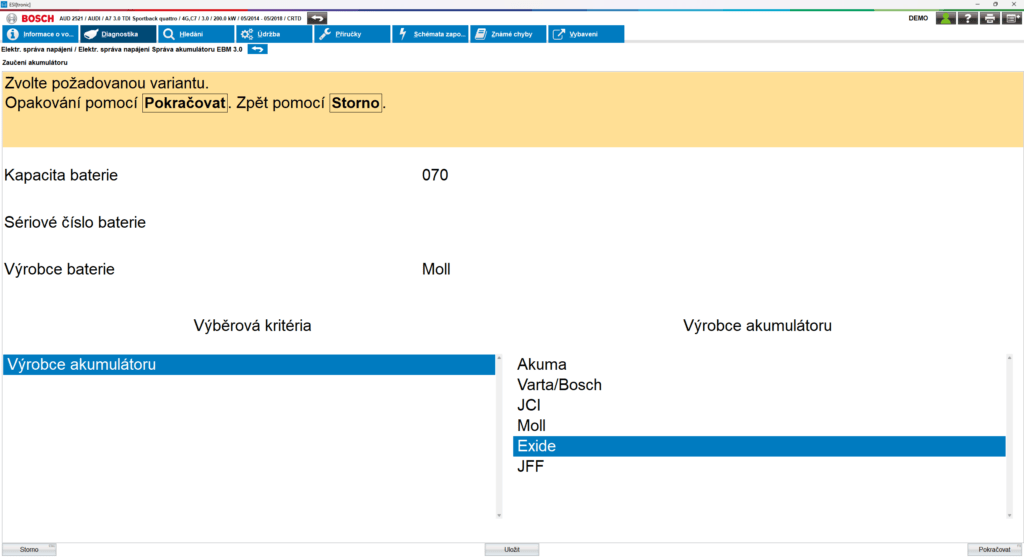
- The diagnostics will prompt you to enter the Ah capacity of the battery. Enter the value listed on the car battery label here.
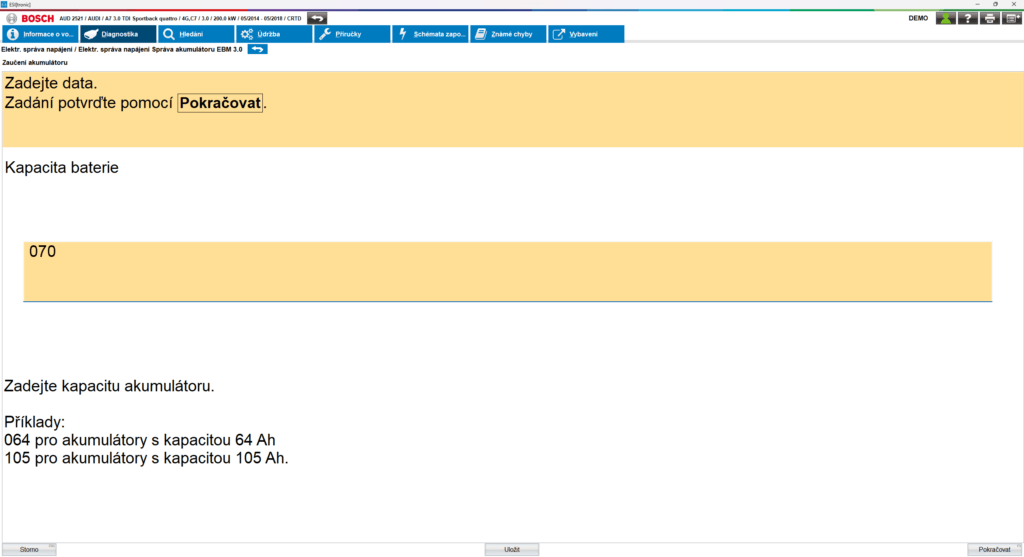
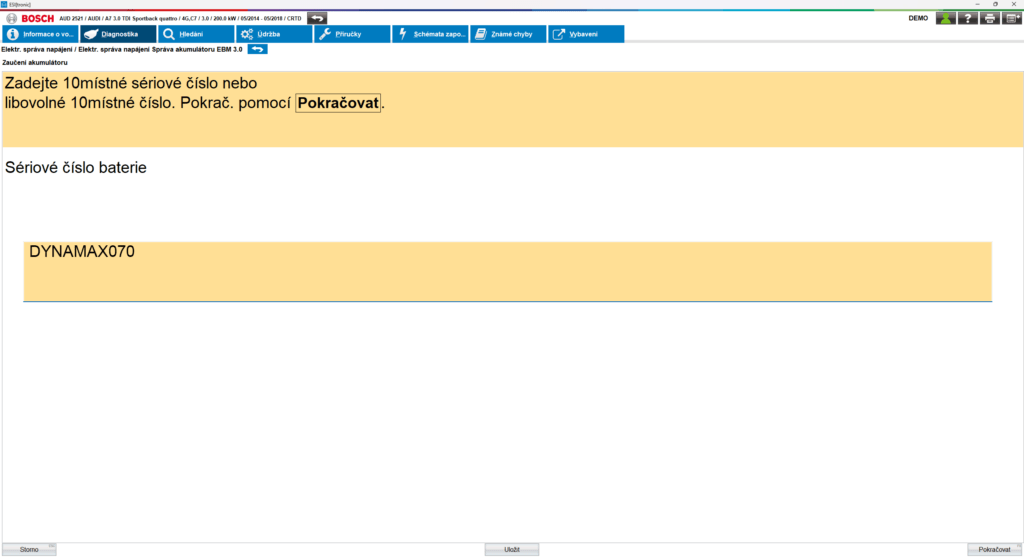
- To customize the battery, you can use the customization key (10-digit serial number-BEM code) listed on the car battery label, e.g. “DYNAMAX070” for a 70Ah battery, and start the coding.
If you have a 62Ah battery, enter: “DYNAMAX062”
If you have a 72Ah battery, enter: “DYNAMAX072”
If you have a 80Ah battery, enter: “DYNAMAX080”
If you have a 95Ah battery, enter: “DYNAMAX095”
Important: If this procedure does not work for you, follow the vehicle manufacturer’s instructions.
- Connecting diagnostic tool VARIANT B
A diagnostic device that allows battery registration has to be used (e.g. Bosch KTS 560/590 , Hella Gutmann etc.). The tester is connected via the vehicle’s OBD-II port.
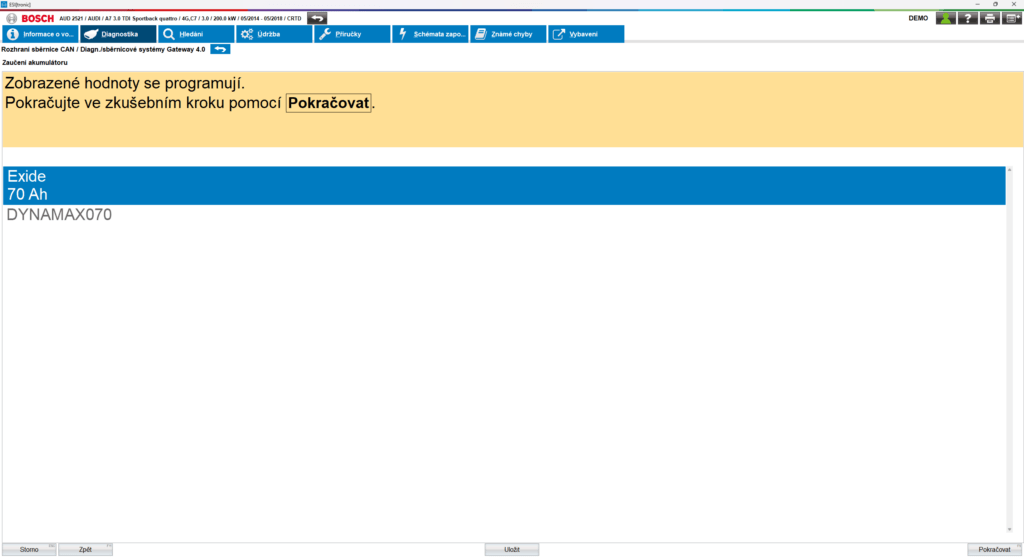
A specific example of a diagnostic procedure for encoding a 70Ah battery using BOSCH KTS560, Variant B on an AUDI A7 2014-2018
- Diagnostics => Service tasks => Electrical Power Management/Battery Replacement => Battery encoding (variant B)
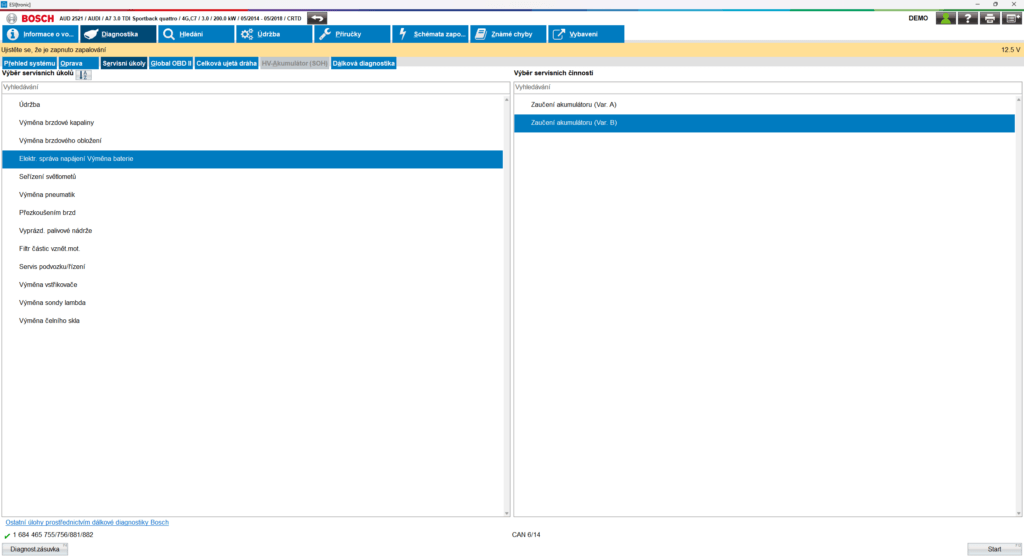
- Then, from the battery manufacturer, we select one (any) of the available options
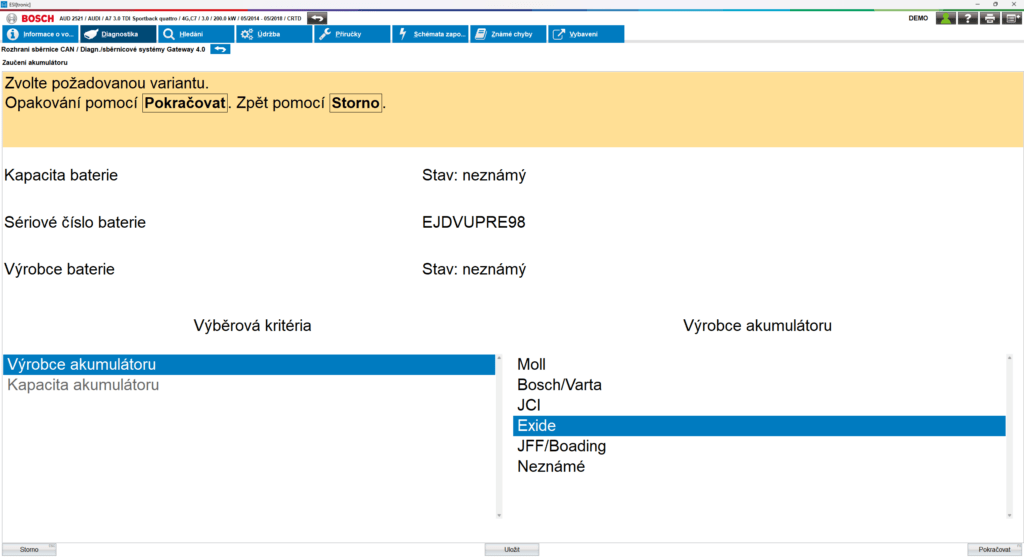
- The diagnostics will prompt you to enter the Ah battery capacity. From the existing values, enter the value that is indicated on the battery (if the value is not in the selection, we will select the closest value, e.g. instead of 62, we will select 61).
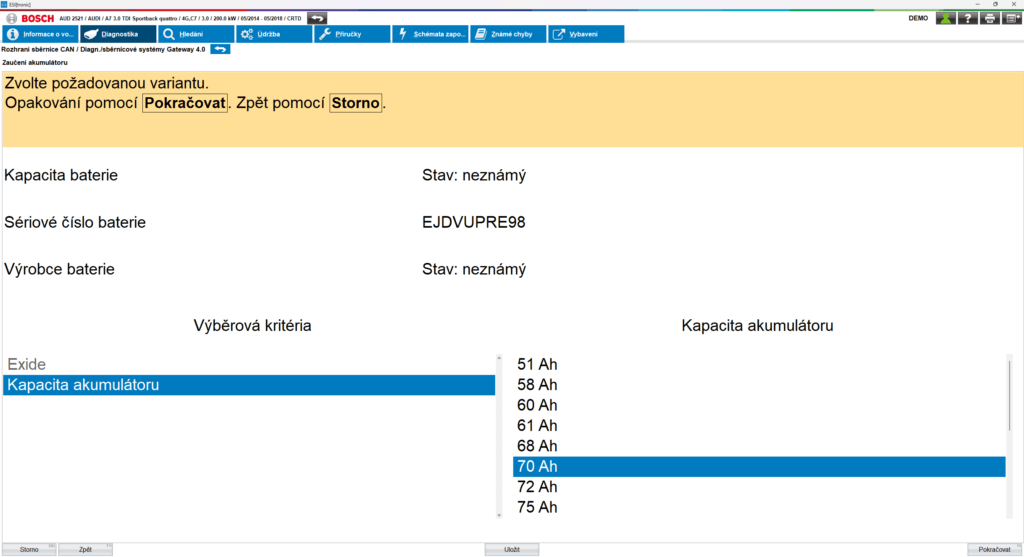
- To adapt the battery, you can use the adaptation key (10-digit serial number-BEM code) listed on the car battery label, e.g. “DYNAMAX070” for a 70Ah battery, and start the coding.
If you have a 62Ah battery, enter: “DYNAMAX062”
If you have a 72Ah battery, enter: “DYNAMAX072”
If you have a 80Ah battery, enter: “DYNAMAX080”
If you have a 95Ah battery, enter: “DYNAMAX095”
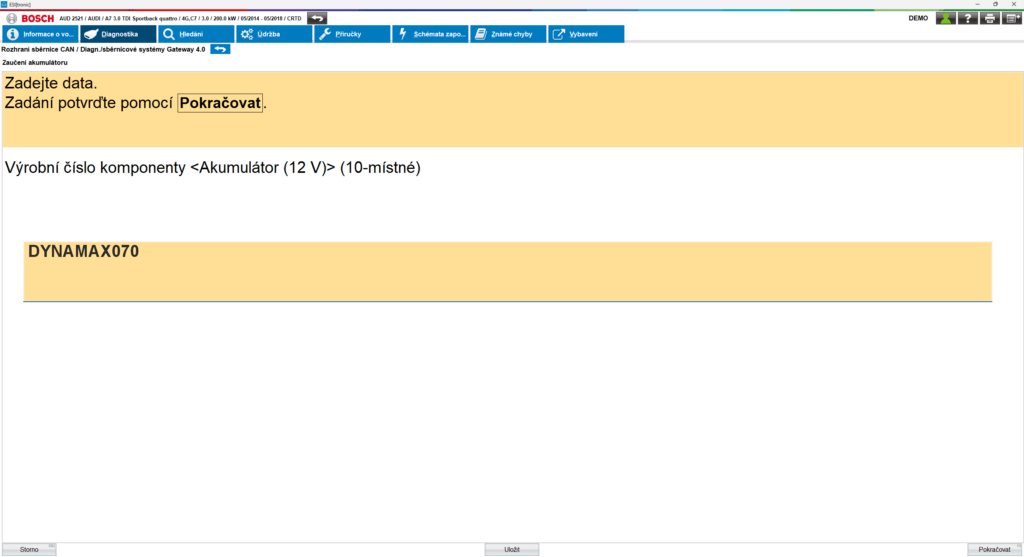
Important: If this procedure does not work for you, follow the vehicle manufacturer’s instructions.
- Registration and data saving
After entering the data, the tester:
- delivers a new code to the BMS / Gateway control unit
- erases the history of the old battery (number of charging cycles, degradation level)
- initializes a new charging control algorithm according to the new capacity and type
After successful registration/encoding, a confirmation of registration will be displayed (e.g. “Battery successfully registered”).
Variant A
Variant B
If encoding is not performed, the car will assume the old battery condition and will not adjust the charging.
- Functionality check
After encoding, it is recommended to:
- start the vehicle and check the alternator charging value (13.8–14.8 V depending on the type),
- verify that the Start-Stop system works after a short drive (sometimes after only 10–20 km),
- check whether any error codes appear (e.g. “battery monitoring – implausible signal”).
- Note for vehicles without mandatory encoding
Some vehicle models (e.g. older Ford, Opel, Renault) do not require battery encoding, but it is recommended to at least reset the charge control adaptations, so that the system evaluates the new battery correctly.